

Information on how to update your Z-Wave device firmware.
Overview
The firmware on many Z-Wave device's can be updated. The Update Device Firmware function allows you to update one device at a time. If you wish to update multiple identical devices at once, we recommend using Z-Flash. The firmware file will be required to update the device using this function.
Procedure
-
Obtain the firmware file you wish to use and save it to a location on your computer's hard drive. If you download a file with a web browser, it will normally save to your downloads folder.
-
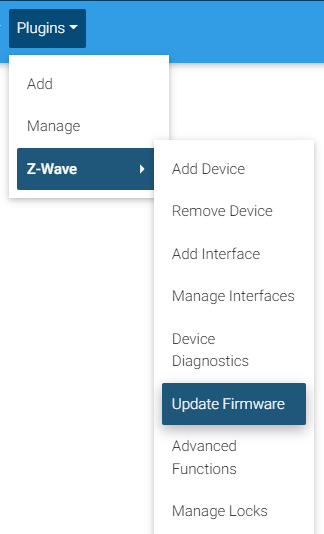
Access the HS4 web interface and navigate to Plugins→ Z-Wave→ Update Device Firmware
-
Select the device to be updated via the drop down menu, click Continue.
-
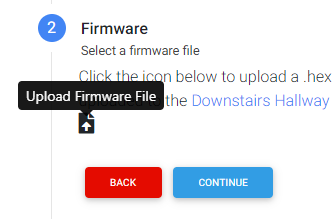
In Step 2, browse for the firmware file you wish to flash to your device by clicking the Upload Firmware File icon.
-
Confirm that you do want to flash the firmware file in Step 3
Note: Flashing the incorrect or bad firmware files can cause your device to be inoperable. Proceed at your own risk. -
The firmware flashing can take anywhere from 1 to 10 minutes depending on the size of the file.
-
Once complete, you can preview the results and go back to your device list by clicking Finish.
Notes
The accepted file types are .gbl .hec and .hex