

Information on accessing the Z-Wave JS Front-End from Z-Wave Plus
Overview
Z-Wave Plus uses Z-Wave JS UI, an open source Z-Wave integration project that has its own UI and settings. This may be accessed within Z-Wave Plus but it is not shown on the Z-Wave Plus menu by default. Use this guide to enable access to the Z-Wave JS Front-End.
IMPORTANT: HomeSeer fully supports the Z-Wave Plus plugin. However, HomeSeer does not directly support Z-Wave JS UI. Please refer to Z-Wave JS UI Documentation for help with Z-Wave JS UI.
Steps
-
Navigate to Plugins > Z-Wave Plus > Manage Networks.
-
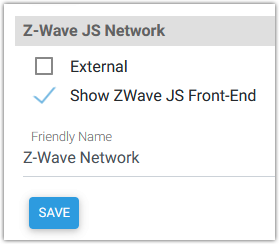
Scroll down to the Z-Wave JS Network section, check the box for Show ZWave JS Front-End and click SAVE.
-
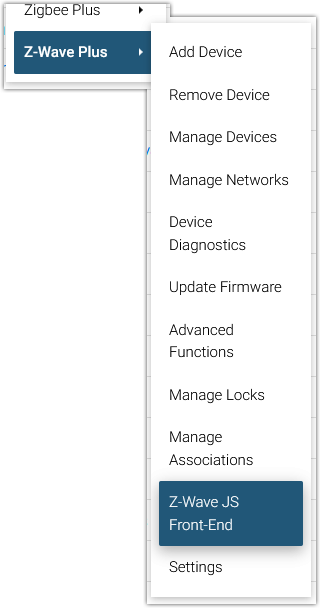
Navigate to Plugins > Z-Wave Plus and you should now see a menu option for Z-Wave JS Front-End.
By default, Z-Wave JS Front-End is designed to be accessed on the local network (LAN). Remote access is possible with the use of port forwarding (for port 8091) but not via MyHS.