

Use this function to access operating system tools and functions.
Overview
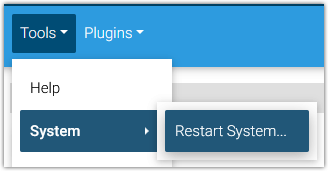
System resources may be accessed by opening the Tools menu and selecting System.
System Options
Windows
Navigate to Tools > System > Restart System to restart your HomeSeer system.
Linux
The following options are available on Linux HS4 systems:
-
Shutdown HomeSeer… - Shuts down HS4 but does not shut down Linux.
-
Shutdown System… - Shuts down HS4 and Linux.
-
Restart System… - Restarts HS4 and Linux.
-
Linux Tools - Opens a command prompt for entering Linux commands. Use the Linux login, which is “homeseer” by default. If you created your own version of Linux, use the login you created.
-
Change System Password - Allows users to change the default Linux system password.