

Information about the HS4 system log
Overview
The HS4 system log is designed to maintain a record of everything that happens in the system. The log screen includes a filter section at the top and a running list of log entries at the bottom. The log may be set to automatically update or may be manually updated with a screen refresh.
Log Filters
The log may be filtered by date, time, search term and also by feature or entry type using these fields or controls:
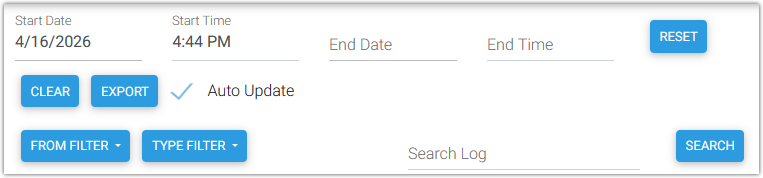
-
Start Date - Use to set the starting date for the log entries
-
Start Time - Use to set the starting time for the log entries
-
End Date - Use to set the ending date for the log entries
-
End Time - Use to set the ending time for the log entries
-
FROM FILTER - Use to specify the feature or integration (plugin) generating the log entries
-
TYPE FILTER - Use to specify the entry type of the log entries
Buttons are provided for additional tasks
-
RESET - Resets the log to the selected date and time parameters.
-
CLEAR - Clears all current log entries from the screen. This is a non-destructive display feature only.
-
EXPORT - Exports the currently displayed entries to a text file that may be downloaded.
-
SEARCH - Executes a search of what is typed into the Search Log field.
Log Entries
The following fields are tracked for each log entry:
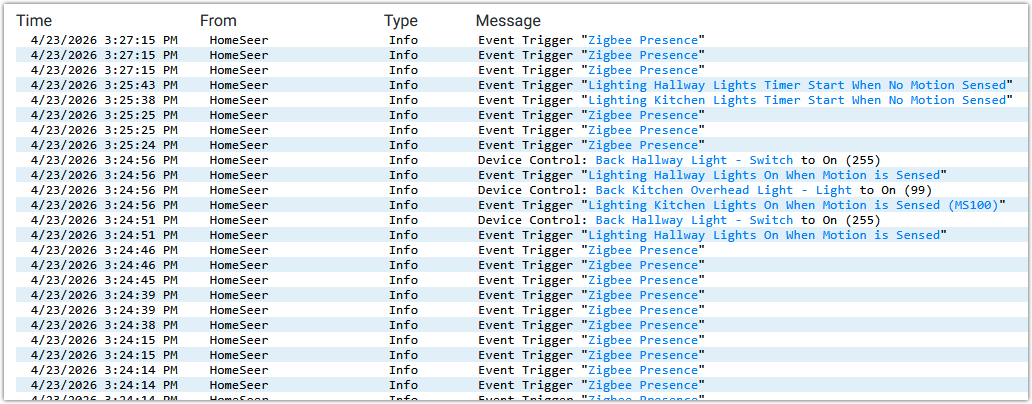
-
Time - Includes the Date and Time of the entry.
-
From - Denotes what generated the entry. This could be from the system itself (ie “HomeSeer”) or could be from any of the installed plugins.
-
Type - Denotes the type of entry. This could be a standard type such as Info, Event or Error or it may be specific to a plugin or other integration installed with the system.
-
Message - Displays more detailed information about the entry.