

Information on updating the Z-Wave SDK firmware on the Z-NET PRO Z-Wave network adapter
Overview
This firmware update is for the HomeSeer Z-NET PRO network interface.
Requirements
-
HomeSeer Z-NET PRO Z-Wave network interface
-
A Windows PC running Windows 10 or later
Downloads
|
Download |
Version |
Release Notes |
|---|---|---|
|
PC Controller & Firmware (for Z-NET PRO)
|
|
Added in 7.24.1
Improved the Series 800 radio reception capability in environments crowded by wake-up beams. Added in 7.24.0
|
Procedure
Please read these instructions carefully before updating your stick. Note that the following instructions reference the UI in the Z-Wave Core plugin. If you are running the UI plugin, you still have access to the same functions but the UI will be different.
-
Download and extract the files to a Windows PC. This can be the PC running HomeSeer or another PC. The zip contains a folder named "pc controller" and a file with a .GBL extension. The GBL file is the firmware update file and the pc controller is a tool you will use to apply the update to your Z-NET.
-
Backup your Z-NET PRO node information, following the instructions for your particular hub software.
-
Shut down your hub to disconnect it from the Z-NET PRO.
-
Power-cycle the Z-NET PRO and ensure that the Z-Wave LED is not lit.
-
In the pc-controller folder where you unzipped the files, run the EXE "ZWaveControllerUI.exe" program.
If you get a “Windows protected your PC” pop-up, click More info and then click Run anyway to launch the PC Controller.
-
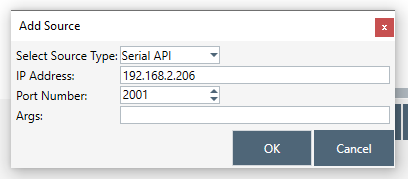
Click on the gear icon at the top of the screen. Click the Add button below and change the Source Type to Serial API, then enter the IP Address of your Z-NET and Port Number 2001 (our default Z-NET port setting). Then click OK.
-
In the upper right corner of the screen you will see a button labeled "OTW Firmware Update". Click that and it will prompt for a file. Select the .GBL file that was in the download zip.
-
The update should start immediately. Wait for this to finish.
-
Shut down PC Controller and restart your hub. The process is complete.